Meeting Transcription
Turn a recorded discussion into a reviewable record, with timestamps and an editable minutes draft.
MP3, WAV, M4A, MP4, FLAC, OGG · Up to 500 MB
What is meeting transcription?
Meeting transcription converts a saved meeting recording into text you can search, review and turn into minutes. Upload an audio or video file from your meeting platform, then correct the transcript before creating a notes draft. Paid recordings can generate AI minutes with a summary, decisions and action items. A separate free local draft selects source excerpts and English keywords. Both need review of names, dates, negations and unresolved questions before sharing.
How to transcribe your meeting
- STEP 1
Download the meeting recording
Find the recording in the host’s meeting platform and download an allowed MP4 or audio file. A meeting invitation or restricted replay link is not a direct media download. Ask the owner for the file if your account cannot download it.
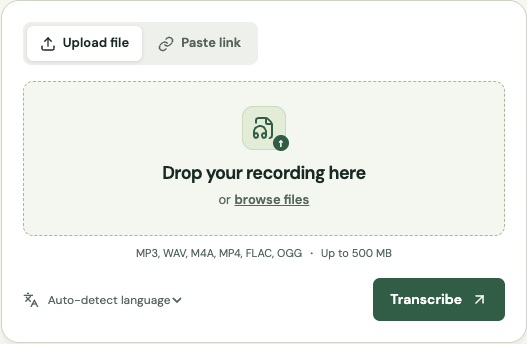
- STEP 2
Upload and transcribe
Select the recording and language. Check that the file fits the 500 MB limit and your remaining minutes. Paid uploads can be up to two hours each. Keep the original recording available for checking decisions and disputed wording.
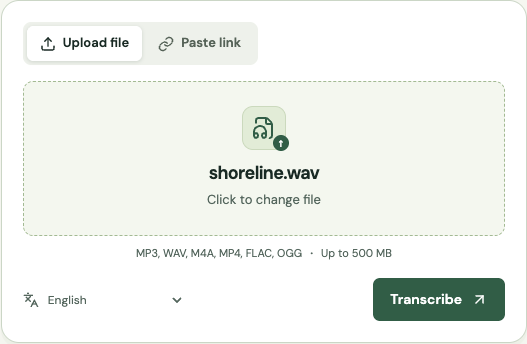
- STEP 3
Review people and commitments
Correct names, amounts and dates in the cue editor. Paid speaker labels can be renamed after you identify the voices. Pay particular attention to sentences where someone rejects a proposal or makes agreement conditional on another event.
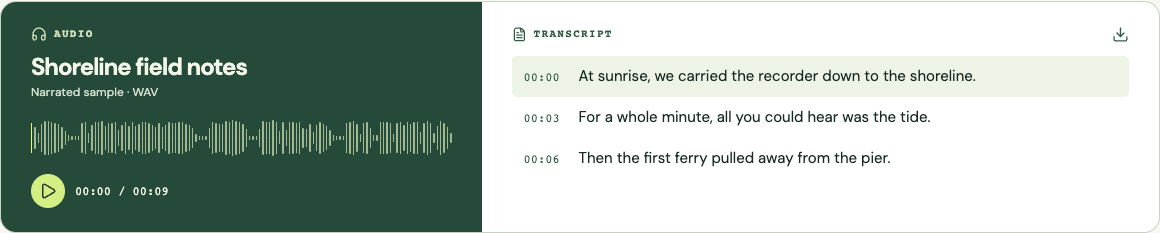
- STEP 4
Create and share reviewed minutes
Choose Generate AI notes for a paid recording, or Create local draft for excerpt-based notes. Add the meeting date, participants, owners and due dates. Download the edited draft as TXT or DOCX and keep its evidence timestamps when sending it to colleagues.
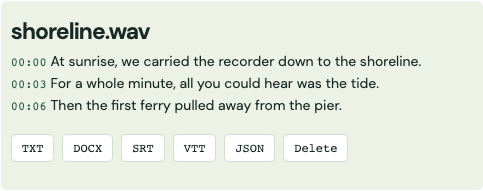
Screenshots show the shared transcription workflow with a sample recording.
The hard part: a discussion is not a decision
People explore options aloud. “We could launch Friday” may be a suggestion, while “we will launch Friday if testing passes” is a conditional commitment. A transcript preserves the language but does not decide which statement governs the project. Review the nearby turns, look for explicit agreement and note any dependency. If the group never settled an issue, record it as open instead of turning the most confident-sounding comment into a decision.
The local minutes draft uses source excerpts and English keyword matches. It may surface a sentence containing “approved” even if the speaker said “not approved,” and it may miss an action expressed without the expected wording. Treat the candidate list as a review aid. It does not infer every owner, date or dependency. Paid recordings also offer AI notes through Replicate, which summarize the original provider transcript and can identify proposed decisions and actions. AI output can be wrong, so review it against the recording too. The editable field lets you replace the draft with the concise record your team actually needs.
Keep a distinction between a decision, an action and background context. A decision states what the team agreed. An action names a person and a concrete next step. Context explains why the choice was made or records a constraint. When all three are mixed into one long paragraph, the next reader has to reconstruct the meeting. Separate them and include a timecode for any item that is likely to be questioned later.
Write minutes someone can act on
Use a short, repeatable template: meeting date, participants, decisions, action items and open questions. For each action, write an owner, a deliverable, a due date and an evidence timestamp. If the recording does not establish a deadline, write “date to confirm” rather than inventing one. A fictional example might read: “Alex — send the revised outline — Friday, date to confirm — 00:18:24.” The unresolved date is visible instead of hidden behind a polished sentence.
A useful one-page summary usually leaves out greetings, repeated proposals and troubleshooting chatter. That does not mean those words should disappear from the source transcript. Keep the full reviewed transcript available while distributing the shorter minutes to the audience that needs them. When someone disputes a note, return to the source passage and amend the minutes with a clear revision date rather than changing the evidence without explanation.
Get recording files from Zoom, Teams and Google Meet
For Zoom, use a local recording file or download a permitted cloud recording from the host’s account. Zoom documents MP4 video and M4A audio among its recording formats. An audio-only export can be smaller when you only need speech. The upload tool accepts both. If your organization restricts cloud downloads, ask the recording owner for an authorized copy; a private playback page will not work as a direct audio URL.
Teams recordings are stored in OneDrive or SharePoint, depending on the meeting. Open the recording through the meeting recap or its storage location and use Download when your permissions allow it. Google Meet recordings are saved to the organizer’s Google Drive, where authorized users can download the file. These are file-based workflows: Get Audio Transcript does not join live meetings, connect to calendars or automatically import recordings from those accounts.
Recognize the limits of a crowded room
A laptop at one end of a conference table may capture the nearest speaker clearly and the rest of the room poorly. Speaker labels cannot compensate for a microphone that missed half a sentence. Before a recurring meeting, test the farthest seat and check remote participants separately. Encourage one speaker at a time when decisions are being finalized. If an important interruption is unintelligible, mark it for confirmation rather than attributing a guessed sentence.
Paid speaker detection groups voices but does not know your attendance list. Rename labels after listening to introductions and checking later turns. A single person can receive multiple labels if the microphone or connection changes, and a short interjection may receive the wrong one. For a high-stakes handoff, confirm the action owner with the team. Attendance, speaking time and authority to approve a decision are different things.
Keep a workable handoff and retention routine
Download the result when it is ready. Completed transcripts are scheduled for deletion after the service’s retention window, and your workspace edits live only in the current browser tab. Save the reviewed minutes and the transcript in the project’s approved location. Use filenames that make the meeting date and version obvious. The source recording, full transcript and short minutes may have different audiences, so avoid sharing all three with the broadest group by default.
Before uploading internal discussions, check the organization’s recording and processing rules. The recording is sent to the transcription provider; this is not an on-device transcription workflow. Local note editing does not change that earlier processing. When the content must remain in an organization-controlled environment, use an approved internal service or local software. For ordinary project meetings, establish who will review the draft and when corrections are due so a useful record does not sit unfinished.
Compare transcription approaches
| Approach | Useful for | What to plan for |
|---|---|---|
| Human meeting secretary | Captures context and asks participants to clarify commitments. | Still needs a consistent record and permission to access the discussion. |
| General automatic transcription | Provides searchable wording after the meeting. | Action lists require review; integration features vary by tool. |
| Local/free software | Useful when processing must stay on a controlled device. | Requires setup, hardware and manual distribution of the minutes. |
Platform documentation
Platform permissions and publishing controls can change. Confirm the current requirements before downloading or publishing.
Continue with your recording
Use the online audio transcription tool for other supported formats, or compare paid minutes and features before processing a longer file.
Maintained by Get Audio Transcript · Updated
Common questions
Does this join my live meetings?
No. Download a permitted recording and upload it here. There is no meeting bot, calendar connection or automatic account import.
Are action items generated automatically?
Paid recordings can generate AI summaries and action items. The free local draft flags English keyword matches instead. Confirm owners, deadlines, negations and commitments in either output. One AI generation per recording and note type is included; repeat clicks retrieve the saved result.
Can I upload a Teams or Meet URL?
Use a direct downloadable media URL with browser access, or download the file first. Restricted meeting replay pages and invitations are not supported imports.
Can I identify every participant?
Paid transcription includes automatic speaker labels. Rename them after listening. Overlap and short interjections can cause errors, and labels do not verify someone’s identity.
Do notes use more transcription minutes?
Local notes do not use minutes. A paid recording includes one AI generation per note type, without an extra minute deduction. AI notes use the original transcript, not local corrections. Uploading or retranscribing another file uses its own minutes.